Conftest Policy Checking
Atlantis supports running server-side conftest policies against the plan output. Common usecases for using this step include:
- Denying usage of a list of modules
- Asserting attributes of a resource at creation time
- Catching unintentional resource deletions
- Preventing security risks (i.e. exposing secure ports to the public)
How it works?
Enabling "policy checking" in addition to the mergeable apply requirement blocks applies on plans that fail any of the defined conftest policies.
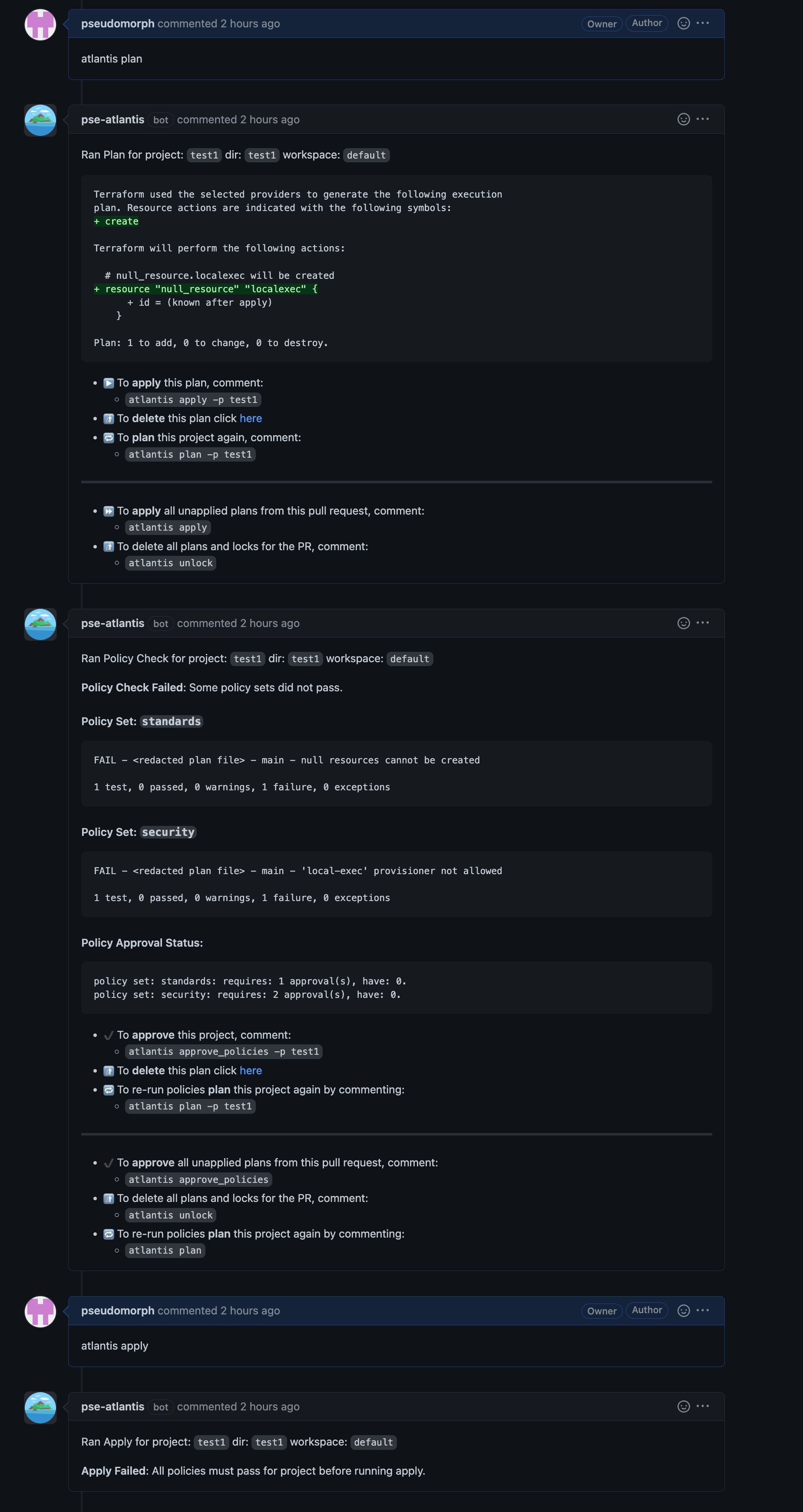

Any failures need to either be addressed in a successive commit, or approved by top-level owner(s) of policies or the owner(s) of the policy set in question. Policy approvals are independent of the approval apply requirement which can coexist in the policy checking workflow. After policies are approved, the apply can proceed.
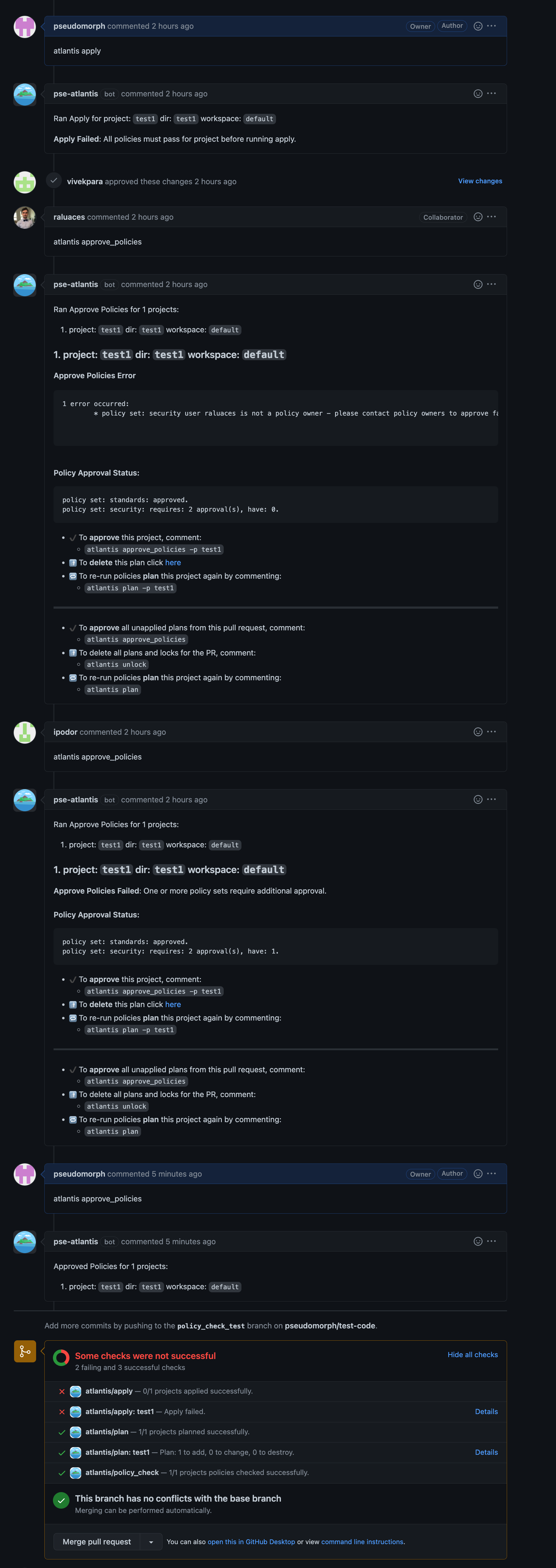
Policy approvals may be cleared either by re-planning, or by issuing the following command:
atlantis approve_policies --clear-policy-approvalWARNING
By default, any plans following the approval will discard all policy approvals and prompt again for them. To change this behavior, see Sticky Policy Approvals.
Getting Started
This section will provide a guide on how to get set up with a simple policy that fails creation of null_resource's and requires approval from a blessed user.
Step 1: Enable the workflow
Enable the workflow using the following server configuration flag --enable-policy-checks
WARNING
All repositories will have policy checking enabled.
NOTE
If you are using the --gh-team-allowlist flag to restrict which teams can run commands, you must also allowlist the policy_check command for policy checks to work on manual atlantis plan commands.
For example:
atlantis server --gh-team-allowlist="*:plan,*:policy_check,*:unlock,myteam:apply"Alternatively, you can use allowed_overrides: [policy_check] in your server-side repo config.
Why is this needed?
policy_checkis an internal command that runs automatically afterplan- When using team allowlists, Atlantis checks if the user is authorized to run
policy_check - Autoplans bypass this check (they don't have a user), which is why they work without this configuration
- Without allowlisting
policy_check, manualatlantis plancommands will plan successfully but skip policy checks
See Repo and Project Permissions for more information about team allowlists.
Step 2: Define the policy configuration
Policy Configuration is defined in the server-side repo configuration.
In this example we will define one policy set with one owner:
policies:
  owners:
    users:
      - nishkrishnan
  policy_sets:
    - name: deny_null_resource
      path: <CODE_DIRECTORY>/policies/deny_null_resource/
      source: local
    - name: deny_local_exec
      path: <CODE_DIRECTORY>/policies/deny_local_exec/
      source: local
      approve_count: 2
      owners:
        users:
- pseudomorphname- A name of your policy set.path- Path to a policies directory. Note: replace<CODE_DIRECTORY>with absolute dir path to conftest policy/policies.source- Tells atlantis where to fetch the policies from. Currently you can only host policies locally by usinglocal.owners- Defines the users/teams which are able to approve a specific policy set.approve_count- Defines the number of approvals needed to bypass policy checks. Defaults to the top-level policies configuration, if not specified.prevent_self_approve- Defines whether the PR author can approve policies.sticky_policy_approvals- Whentrue, approvals survive re-plans as long as no new policy output items (as matched bypolicy_item_regex) are introduced. See Sticky Policy Approvals.policy_item_regex- Regex used to extract comparable items from policy output for sticky approval tracking. See Sticky Policy Approvals.
By default conftest is configured to only run the main package. If you wish to run specific/multiple policies consider passing --namespace or --all-namespaces to conftest with extra_args via a custom workflow as shown in the below example.
Example Server Side Repo configuration using --all-namespaces and a local src dir.
repos:
  - id: github.com/myorg/example-repo
    workflow: custom
policies:
  owners:
    users:
      - example-dev
  policy_sets:
    - name: example-conf-tests
      path: /home/atlantis/conftest_policies  # Consider separate vcs & mount into container
      source: local
workflows:
  custom:
    plan:
      steps:
        - init
        - plan
    policy_check:
      steps:
        - policy_check:
            extra_args: ["-p /home/atlantis/conftest_policies/", "--all-namespaces"]
Note
Conftest is run with an argument vector rather than through a shell. A policy set path and each extra_args entry are still split on whitespace, so a value carrying more than one argument, like "-p /home/atlantis/conftest_policies/" above, keeps working. Shell operators and command substitution are passed through as ordinary text. To use a path that genuinely contains a space, quote it, e.g. "'/home/atlantis/my policies'". Environment references in unquoted or double-quoted text are expanded from the policy-check environment without splitting the expanded value. Use single quotes or a backslash before $ when the reference should remain literal.
Step 3: Write the policy
Conftest policies are based on Open Policy Agent (OPA) and written in rego. Following our example, simply create a rego file in null_resource_warning folder with following code, the code below a simple policy that will fail for plans containing newly created null_resources.
package main

resource_types = {"null_resource"}

# all resources
resources[resource_type] = all {
    some resource_type
    resource_types[resource_type]
    all := [name |
        name:= input.resource_changes[_]
        name.type == resource_type
    ]
}

# number of creations of resources of a given type
num_creates[resource_type] = num {
    some resource_type
    resource_types[resource_type]
    all := resources[resource_type]
    creates := [res |  res:= all[_]; res.change.actions[_] == "create"]
    num := count(creates)
}

deny[msg] {
    num_resources := num_creates["null_resource"]

    num_resources > 0

    msg := "null resources cannot be created"
}
That's it! Now your Atlantis instance is configured to run policies on your Terraform plans 🎉
Customizing the conftest command
Pulling policies from a remote location
Conftest supports pulling policies from remote locations such as S3, git, OCI, and other protocols supported by the go-getter library. The key extra_args can be used to pass in the --update flag to tell conftest to pull the policies into the project folder before running the policy check.
workflows:
  custom:
    plan:
      steps:
        - init
        - plan
    policy_check:
      steps:
        - policy_check:
            extra_args: ["--update", "s3::https://s3.amazonaws.com/bucket/foo"]
Note that authentication may need to be configured separately if pulling policies from sources that require it. For example, to pull policies from an S3 bucket, Atlantis host can be configured with a default AWS profile that has permission to s3:GetObject and s3:ListBucket from the S3 bucket.
Running policy check against Terraform source code
By default, Atlantis runs the policy check against the SHOWFILE. In order to run the policy test against Terraform files directly, override the default conftest command used and pass in *.tf as one of the inputs to conftest. The show step is required so that Atlantis will generate the SHOWFILE.
workflows:
  custom:
    policy_check:
      steps:
        - show
        - run: conftest test $SHOWFILE *.tf --no-fail
Quiet policy checks
By default, Atlantis will add a comment to all pull requests with the policy check result - both successes and failures. Version 0.21.0 added the --quiet-policy-checks option, which will instead only add comments when policy checks fail, significantly reducing the number of comments when most policy check results succeed.
Data for custom run steps
When the policy check workflow runs, a file is created in the working directory which contains information about the status of each policy set tested. This data may be useful in custom run steps to generate metrics or notifications. The file contains JSON data in the following format:
[
  {
    "PolicySetName": "policy1",
    "PolicyOutput": "FAIL - plan.json - main - WARNING: resource creation is prohibited.\n\n1 test, 0 passed, 0 warnings, 1 failure, 0 exceptions\n",
    "Passed": false,
    "ReqApprovalCount": 1,
    "Approvals": null,
    "Hashes": ["ae6b7acaaedaf6fcd3d1823643dbf2ef1aa25374a99b44b1923d8227cc9707e3"],
    "PolicyItemRegex": "(?s).+"
  }
]| Field | Type | Description |
|---|---|---|
PolicySetName | string | Name of the policy set. |
PolicyOutput | string | Raw output from the policy check. |
Passed | bool | Whether the policy check passed. |
ReqApprovalCount | int | Number of approvals required to bypass the failing policy. |
Approvals | []PolicySetApproval | List of approvals, each with an Approver username and Hashes snapshot. |
Hashes | []string | SHA-256 hex digests of items extracted from the policy output using policy_item_regex. |
PolicyItemRegex | string | The regex used to extract items from the policy output for hashing. |
Sticky Policy Approvals
By default, when a plan is re-run, all prior policy approvals are discarded. This means that after every atlantis plan, policy owners must re-approve even if nothing about the policy failures changed.
Sticky policy approvals allow approvals to survive re-plans, as long as no new items appear in the policy output (matched via policy_item_regex). This is useful in workflows where plans are frequently re-run (e.g., due to base branch updates) but the policy violations remain the same or are being resolved.
How it works
When sticky approvals are enabled, Atlantis extracts items from policy output using policy_item_regex and hashes them. Each approval records a snapshot of these hashes. On re-plan, approvals are carried forward only if their recorded hashes still cover the current output. Adding or changing items invalidates approvals; removing items (e.g., fixing a violation) preserves them.
Enabling sticky approvals
Enable at the top level to apply to all policy sets:
policies:
  owners:
    users:
      - policyowner
  sticky_policy_approvals: true
  policy_sets:
    - name: security-policy
      path: /policies/security
      source: local
Or enable per policy set:
policies:
  owners:
    users:
      - policyowner
  policy_sets:
    - name: security-policy
      path: /policies/security
      source: local
      sticky_policy_approvals: true
    - name: cost-policy
      path: /policies/cost
      source: local
      # This policy set uses default (non-sticky) behavior
A per-policy-set sticky_policy_approvals value overrides the top-level setting. This lets you enable sticky approvals globally but opt specific policy sets out (or vice versa).
Customizing the policy item regex
The policy_item_regex controls which parts of the policy output are used as the "identity" for sticky approval tracking. The default is (?s).+, which matches the entire output as a single item. This means any change to the output invalidates the approval — an all-or-nothing approach.
For granular per-item tracking, override the regex to match individual items. For example, .+ (without (?s)) matches each non-empty line as a separate item:
policies:
  owners:
    users:
      - policyowner
  sticky_policy_approvals: true
  policy_item_regex: ".+"
  policy_sets:
    - name: security-policy
      path: /policies/security
      source: local
With .+, each line is tracked independently. Approvals remain valid as long as every current line was present at approval time. Fixing a violation (removing a line) preserves existing approvals; adding or changing one invalidates them.
TIP
The subset semantics above are intentional: an approval covers a specific set of items, and any current item must have been part of that set. Removing items (e.g., a policy author fixes a previously-flagged violation) is treated as progress and does not invalidate prior approvals. Only the appearance of new or changed items triggers re-approval.
For text output, use (?m)^FAIL.* to track only lines starting with FAIL:
policy_item_regex: "(?m)^FAIL.*"TIP
Use the (?m) flag prefix to enable multiline matching, so ^ and $ match the start and end of each line rather than just the start and end of the entire string.
A per-policy-set policy_item_regex can override the top-level default:
policies:
  owners:
    users:
      - policyowner
  sticky_policy_approvals: true
  policy_item_regex: "(?m)^FAIL.*"
  policy_sets:
    - name: security-policy
      path: /policies/security
      source: local
      policy_item_regex: ".+"
Duplicate approval prevention
When sticky approvals are used with approve_count > 1, the same user cannot provide multiple approvals for the same policy set with the same hashes. If a user has already fully approved a policy set and the extracted items haven't changed, subsequent approval attempts by the same user will produce an error asking for a different policy owner to approve.
Running policy check only on some repositories
When policy checking is enabled it will be enforced on all repositories, in order to disable policy checking on some repositories first enable policy checks and then disable it explicitly on each repository with the policy_check flag.
For server side config:
# repos.yaml
repos:
- id: /.*/
  plan_requirements: [approved]
  apply_requirements: [approved]
  import_requirements: [approved]
- id: /special-repo/
  plan_requirements: [approved]
  apply_requirements: [approved]
  import_requirements: [approved]
  policy_check: false
For repo level atlantis.yaml config:
version: 3
projects:
- dir: project1
  workspace: staging
- dir: project1
  workspace: production
  policy_check: false